
Guest post by Mohammed Imran
The quiet fear behind most small business website projects is paying twice: once for the site, and again to fix the site. It rarely happens because of the code. It happens in the first week, when nobody has written down what the website is for. The developer builds what they think you want, you see it and say “that is not what I meant”, and the project turns into rounds of paid changes.
You may be thinking, “I am not technical, so surely that is the developer’s job.” Part of it is. But the developer can only build what you can describe, and describing it takes about an hour, not a skill. Do that hour before you contact anyone and most of the risk goes away.
This guide walks through the planning in the order that works for a small business with no technical team: purpose, audience, pages, content, ownership, budget and the questions to ask a developer. Try the first step now, with a pen. It takes two minutes, and you will know straight away whether you are ready.
1. Write down one job for the website
Start with a single sentence: “This website exists so that [who] can [do what], and we know it works when [measurable result].”
For a clinic it might be: “Patients can find our timings and book an appointment, and it works when bookings by phone and form go up.” For a manufacturer: “Buyers can find our product range and send an enquiry, and it works when we get five qualified enquiries a month.”
If you cannot finish the sentence, you are not ready to hire a developer. If you have three jobs, choose the main one. A website that tries to sell, recruit, publish news and take payments in version one is usually late and expensive.
2. Describe your visitor, not your company
Most small business sites talk about the company: our history, our values, our team. Visitors arrive with a question. Write down the three questions your best customers asked before they bought from you. They might be:
- Do you work in my area, or with a business like mine?
- What does it cost, roughly, and how long will it take?
- How do I contact you, and who will reply?
Those three answers decide your homepage and your menu. Ask your sales or front-desk staff what people phone about. This is better than any survey tool and it costs nothing.
3. List the pages you need, and only those
Make a plain list. A typical small business can start with:
- Home
- One page per main service or product line (not one page for everything)
- About, with real names and photos
- Contact, with phone, email, address and a short form
- A page for your most common questions
Put the pages in the order a visitor would want them, and note which page each service page should lead to next. Draw it on paper if you like. This sketch is what you hand to a developer, and it lets them quote on a clear scope instead of guessing.
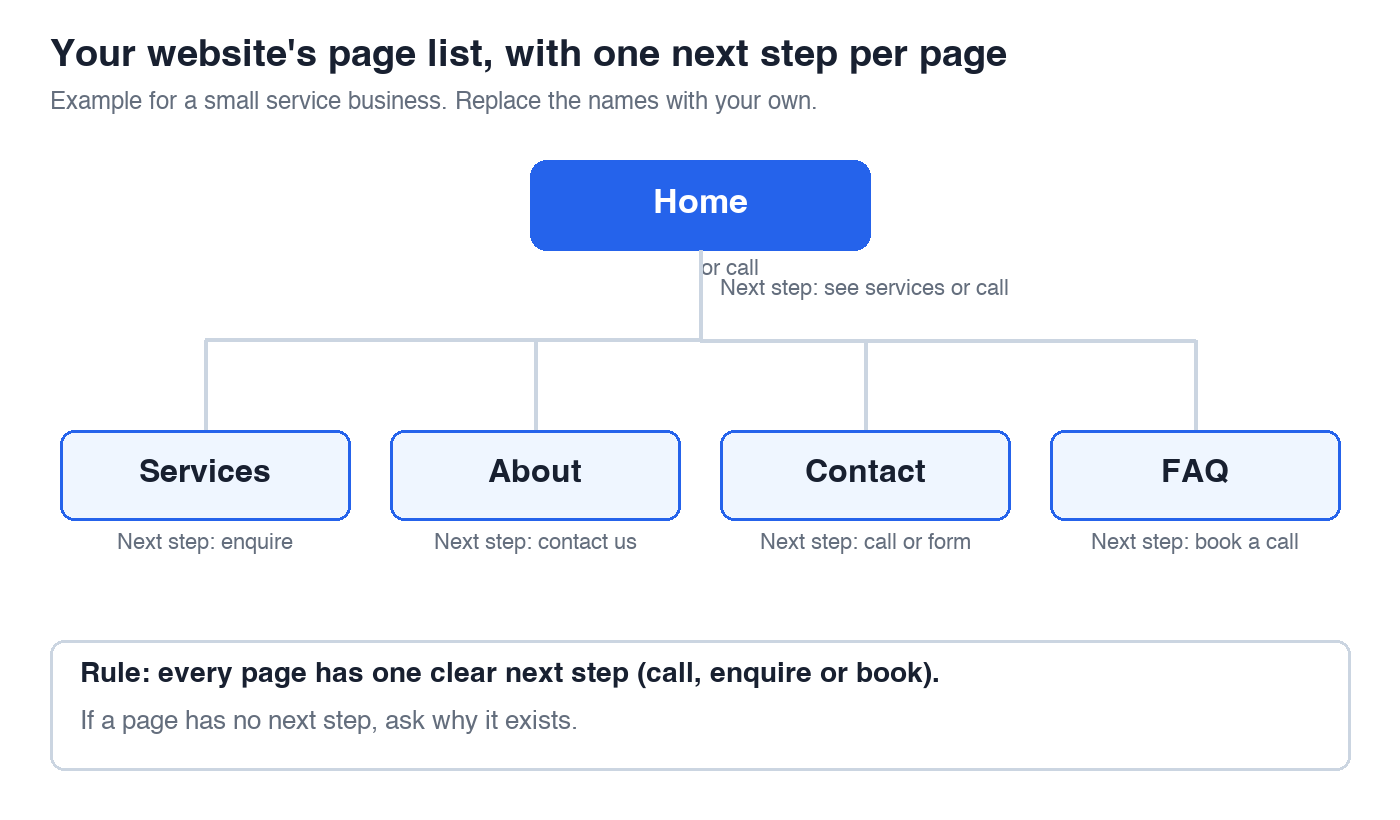
One rule helps: every page needs one clear next step, such as call, enquire or book. If a page has no next step, ask why it exists.
4. Gather the content before the build starts
Delays often come from content, not from design. The developer is ready, and you have not written the service descriptions, taken the photos or found the logo file.
Before you hire, collect:
- Your logo in a high-quality file
- Real photos of your work, premises and team (stock photos of handshakes help nobody)
- A short description of each service: what it is, who it is for, what is included, rough price or how you price
- Testimonials you have permission to use, with the customer’s name or business
- Legal text you need, such as a privacy policy or terms
If you plan to write the text yourself, set a date and keep it. If you plan to hire a writer, tell the developer, because the schedule changes.
5. Decide what you must own
Ask early, in writing, about three things so they cannot become disputes later:
- Domain name: it should be registered in your name, with your email, even if the developer buys it for you.
- Hosting and logins: you should have the admin login for your website and hosting, not only the developer.
- Source files and content: you should receive the finished site files, design files and any custom work when you have paid.
If a developer refuses to give you admin access, treat that as a warning.
6. Set a budget in ranges, and know what drives cost
You do not need an exact number, but you need a range and a reason for it. What usually changes the price of a small business website:
- The number of pages and page types
- Custom design against a ready-made template
- Features such as online booking, payments, a members area or a shop
- Writing, photography and translation
- Ongoing support, updates and security
Ask for a quote that splits these out. A single lump figure hides what you are paying for and makes it hard to compare two developers.
Also plan for after launch. A website needs hosting, backups, security updates and small content changes. Ask who does these, how often, and what it costs, before you sign.
7. Plan for the basics that people forget
Three things are cheaper to ask for at the start than to fix later:
Speed on a phone. Many of your visitors will arrive on a mid-range phone with a slow connection. Google publishes simple targets for loading, responsiveness and visual stability, called Core Web Vitals, explained at https://web.dev/articles/vitals. Ask the developer how they will test against them.
Accessibility. Readable text, strong contrast, labels on form fields and descriptions on images help everyone and are the basis of the W3C’s Web Content Accessibility Guidelines (https://www.w3.org/WAI/standards-guidelines/wcag/). Ask which guideline level they build to.
Search visibility. Search engines need a clear page for each service, readable titles and a site they can crawl. Ask how your page list becomes page titles and addresses, and whether old pages will be redirected if you are replacing an existing site, so that you do not lose the visitors you already have.
8. Questions to ask when you talk to developers
Bring your one-sentence purpose, your page list and your content plan. Then ask:
- Can I see two or three live websites you built for businesses of a similar size, and talk to the owners?
- Who exactly will work on my project, and who will I speak to?
- What is included in the quote, and what would cost extra?
- How many rounds of changes are included in design?
- What do you need from me, and by when?
- What happens if I am late with content?
- Who owns the domain, hosting login and files?
- What will it cost to keep the site running next year?
Good developers like these questions, because a prepared client makes the project smoother. If someone avoids them, you have learned something before spending money.
9. A one-page brief you can send today
Put your planning on one page and send it with your first enquiry:
- Business name, location and what you sell
- The one job of the website
- Your three visitor questions
- Your page list
- What content you have and what you still need
- Your budget range and your launch date
- Anything you want to keep from your current site, such as the domain, pages that rank or customer lists
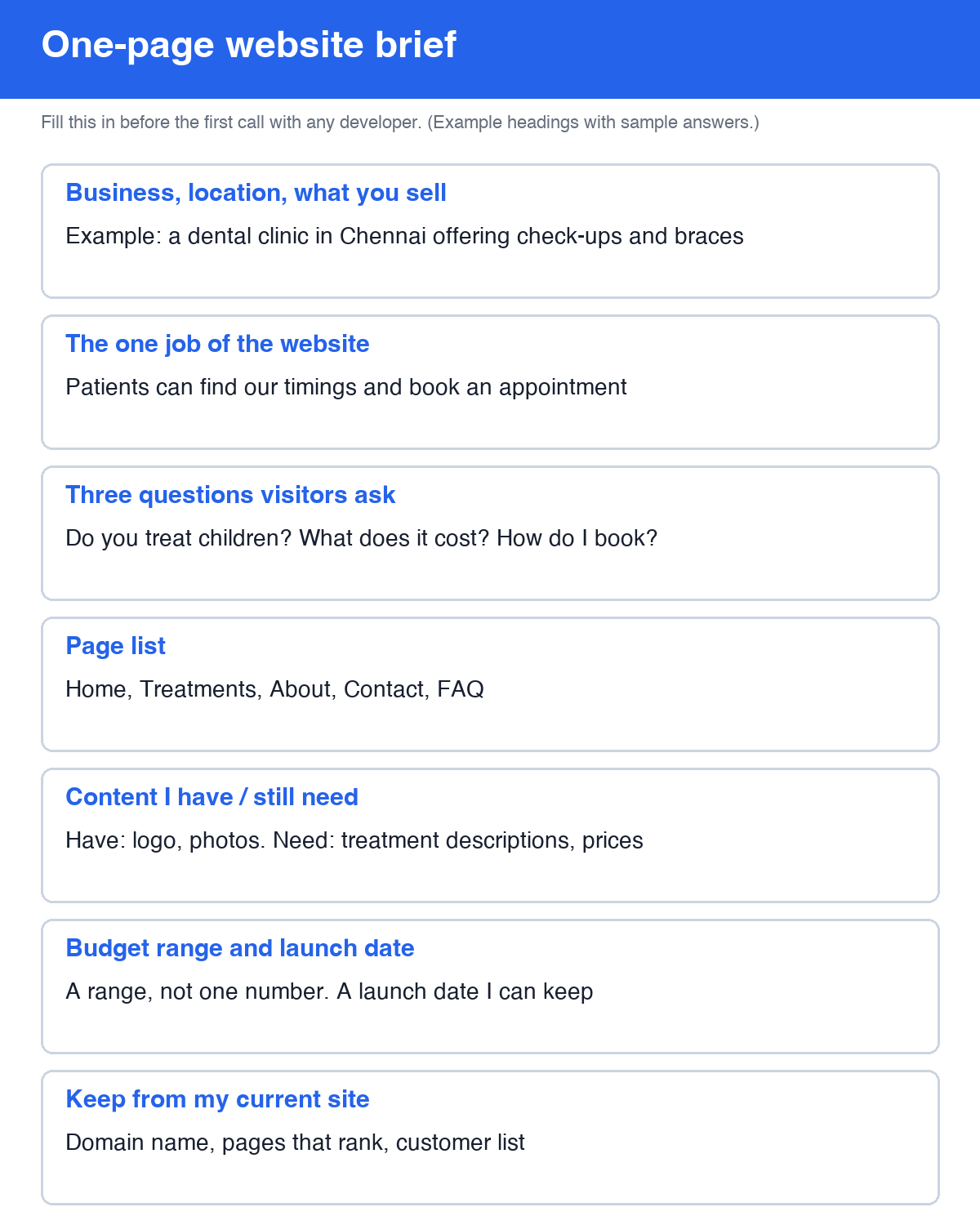
Developers can reply with a clearer quote, and you can compare replies fairly. One more check: if two of the replies describe a different website from the one on your page, the brief was not clear enough, and it is cheaper to fix the brief than the website.
The short version
Decide the one job of the website, describe the visitor, list only the pages you need, gather content first, make sure you own your domain and logins, set a range with a cost breakdown, and ask the developer the eight questions above. An hour of this work before the first call saves weeks later.

About the author
Mohammed Imran is the founder and growth strategist of Tech Conversion (https://techconversion.tech), a digital marketing and web development agency working with businesses in India, the UAE, the US and the UK. He writes about search, website planning and growth strategy for small businesses.
Related reading: What Pages Should a Small Business Website Have? and How to Submit Your Website to Google.
Need help growing your business online? TopReq is run by the team at Boostology, a web design and digital marketing agency.
Services: Website Design, SEO, Social Media Management, Meta Ads.