Webflow, WordPress, and Wix can all produce a professional small business website. They just get there in very different ways, and the right choice depends less on which platform is “best” and more on who will build the site, who will maintain it, and how much you expect it to grow.
This comparison looks at the things that actually matter to a small business owner: cost structure, ease of use, design freedom, SEO, maintenance, and who each platform suits. We won’t quote exact prices, because plans change often. Check each platform’s official pricing page before you decide.
The Short Version
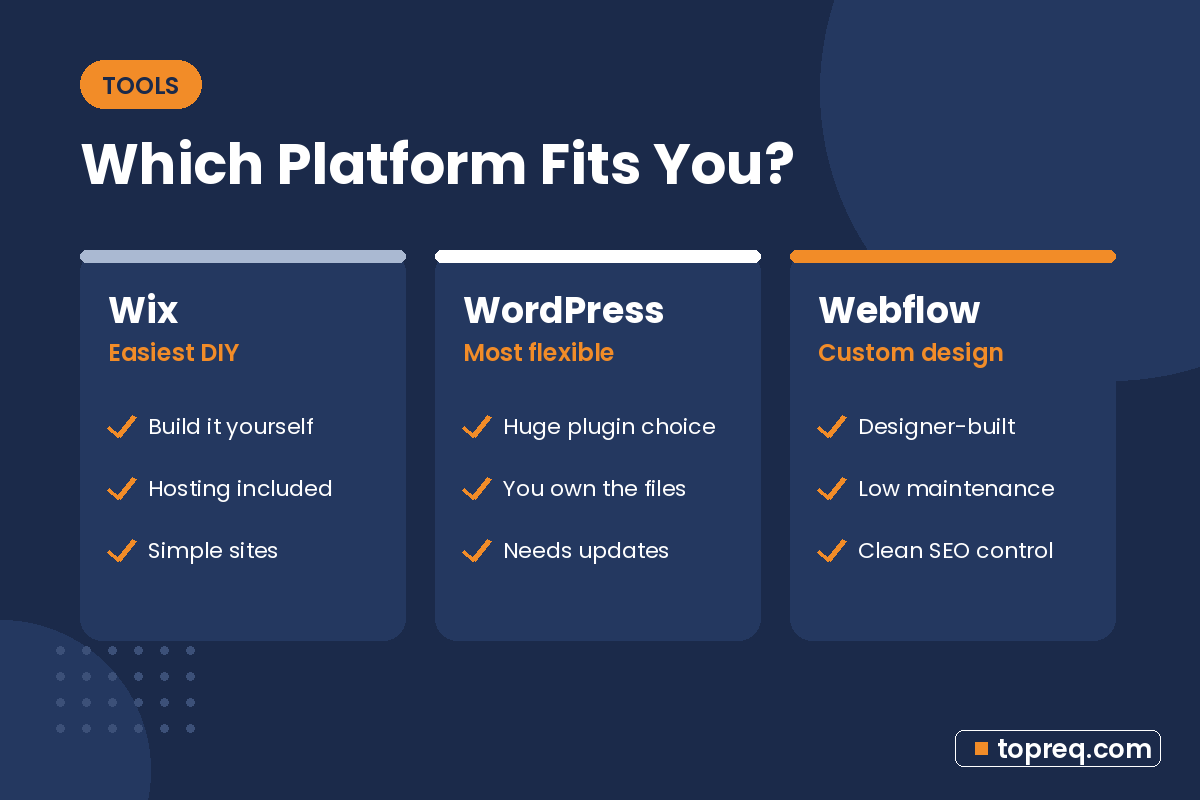
- Wix suits owners who want to build and update a simple site themselves, quickly, with minimal technical work.
- WordPress suits businesses that want maximum flexibility, a huge choice of plugins, and full ownership, and that have someone to handle updates.
- Webflow suits businesses that want a custom, polished design with low maintenance, usually built by a designer or agency.
Quick Look at Each Platform
Wix
Wix is a hosted, all-in-one website builder. You pick a template, drag and drop elements, and publish. Hosting, security, and updates are handled for you. Plans are listed on the Wix plans page.
WordPress
WordPress is open-source software that you install on web hosting you choose. The WordPress project describes it as free software anyone can use and modify. You can download it from WordPress.org, though most hosts install it for you in a few clicks. Thousands of themes and plugins add design options and features. Note that WordPress.org (the self-hosted software) is different from WordPress.com, a hosted service built on it. This comparison focuses on self-hosted WordPress.
Webflow
Webflow is a hosted visual website platform. You design in a visual editor that works with real web layout concepts, and Webflow handles hosting and security. It includes a built-in CMS for blogs and other repeating content. Plans are on the Webflow pricing page.
Cost: How You Pay
The real cost of each platform comes from how it’s structured, not just the headline plan price.
- Wix: one monthly or yearly plan that bundles hosting and the builder. Some apps and features cost extra. Costs are predictable.
- WordPress: the software is free, but you pay for hosting, a domain, and often a premium theme or plugins. Costs can be low or high depending on your setup, and maintenance time or a maintenance service is a cost too.
- Webflow: a site plan for hosting, plus sometimes a workspace plan if a designer or team builds the site. Costs are predictable once the site is built.
For most small businesses, the platform fee is the smaller part of the bill. Design, content, and setup usually cost more. Our guide to how much a small business website costs breaks down those bigger costs.
Ease of Use
Building the site
Wix is generally the easiest for beginners. Its editor is designed for people with no web experience. WordPress sits in the middle: page builders and block themes make it approachable, but setup involves hosting, themes, and plugins. Webflow has the steepest learning curve because it exposes real layout concepts like boxes, spacing, and responsive breakpoints. That’s powerful in skilled hands but can feel complex for a first-time DIY builder.
Updating content day to day
All three let non-technical users edit text, images, and blog posts once the site is set up. Webflow has an editor mode that lets clients change content without touching the design. WordPress’s block editor is familiar to many people. Wix keeps editing and designing in the same place, which is simple but makes it easier to accidentally shift a layout.
Design Flexibility
Webflow offers the most design control without writing code, which is why many designers choose it for custom brand sites. WordPress can do almost anything with the right theme, builder, or custom development, but quality depends heavily on those choices. Wix offers many polished templates and a flexible editor, with less control over fine details and site structure than the other two.
SEO
All three platforms can rank well on Google. Google’s own SEO starter guide focuses on helpful content, clear structure, descriptive titles, and a site that works well for users, and none of those depend on a specific platform. What differs is how much control you get and how much setup it takes:
- Wix: built-in SEO settings for titles, descriptions, URLs, and redirects, with guided setup. Good for owners who want the basics handled.
- WordPress: deep control, usually through an SEO plugin such as Yoast SEO or a similar tool. Performance depends on your hosting, theme, and plugins, so a poorly built WordPress site can be slow.
- Webflow: fine control over titles, meta descriptions, redirects, and clean code output, with fast hosting included. Strong for technical SEO without plugins.
Speed and mobile usability matter for every platform. Google’s page experience documentation explains what it looks at. For local businesses, your site also works together with your Google listing; see our local SEO checklist for small business for the full picture.
Maintenance and Security
This is where the platforms differ most in daily life.
- Wix and Webflow are hosted platforms, so the company handles software updates, hosting security, and SSL. There’s very little to maintain.
- WordPress puts that responsibility on you or your host. WordPress core, themes, and plugins need regular updates, and outdated plugins are a common way sites get compromised. Backups and a security plugin are wise. Many hosts offer managed WordPress plans that take on some of this work.
If nobody on your team will keep a WordPress site updated, either budget for a maintenance service or consider a hosted platform.
Ownership and Flexibility to Move
With self-hosted WordPress, you control the files and database and can move your site to another host whenever you like. Webflow and Wix are hosted platforms, so your site lives on their systems. Moving from either one to a different platform usually means rebuilding the site, although your content, domain, and branding come with you. Webflow offers some code export options on certain plans, and both platforms let you export some content. Check current documentation before you rely on any specific export feature.
Blogs, Stores, and Extra Features
- Blogging: WordPress started as a blogging platform and remains strong here. Webflow’s CMS handles blogs and structured content well. Wix includes a blog app.
- Online stores: all three support ecommerce. WordPress usually does this through a plugin such as WooCommerce. Wix and Webflow have built-in ecommerce plans.
- Bookings, forms, and integrations: WordPress has the widest plugin choice. Wix has an app market with many small business tools. Webflow covers forms natively and connects to other tools through integrations.
Which Should You Choose?
Choose Wix if…
You’re building the site yourself, you need something live quickly, your site is fairly simple, and you’d rather not think about hosting or updates.
Choose WordPress if…
You want full ownership and flexibility, you plan to publish a lot of content or need specific plugins, and you have a developer, agency, or managed host to keep it updated and secure.
Choose Webflow if…
You want a custom, high-quality design, low maintenance, and strong technical SEO, and you’re working with a designer or agency to build it. You or your team can still update content after launch.
Disclosure: TopReq is connected to Boostology, a small-business web agency that builds sites in both Webflow and WordPress. We’ve aimed to keep this comparison balanced; the best platform is the one that fits how your business works.
Frequently Asked Questions
Is Webflow better than WordPress for SEO?
Neither is automatically better. Both can rank well. Webflow gives clean output and fast hosting with less setup, while WordPress gives deep control through plugins but depends more on how it’s built and maintained.
Is WordPress really free?
The WordPress software is free and open source. You still pay for hosting and a domain, and often for themes, plugins, or maintenance.
Can I switch platforms later?
Yes, but it usually means rebuilding the site on the new platform and setting up redirects so you don’t lose search traffic. Choosing carefully up front saves work later.
Which is easiest for a complete beginner?
Wix is typically the easiest for someone building a simple site alone. WordPress and Webflow reward a bit more learning or professional help.
Need help growing your business online? TopReq is run by the team at Boostology, a web design and digital marketing agency.
Services: Website Design, SEO, Social Media Management, Meta Ads.