
Short answer: If your Google Business Profile is suspended, don’t delete it or create a new one. First, fix whatever breaks Google’s guidelines, most often a business name with added keywords, an ineligible address, or the wrong category. Then submit one appeal through the Business Profile appeals tool, with evidence that your name, address, and phone match real documents. Google says reviews can take up to 5 business days. If the appeal is denied, you can ask for one additional review with new evidence.
One morning your listing disappears from Maps, or you sign in and see a red “suspended” or “disabled” notice. Calls slow down, and the email from Google says little more than that your profile doesn’t follow its guidelines. For a local business this can feel like losing your storefront overnight.
Suspensions are often fixable, especially for real businesses that broke a rule without realizing it. This guide explains why profiles get suspended, how to fix the cause, how to file an appeal that has the best chance of being approved, and what to do if it’s denied.
Suspended, Disabled, or Restricted: What’s the Difference?
Google uses a few terms that look alike but mean different things. Its help page on fixing suspended or disabled profiles is the official reference. In plain terms:
- Suspended profile: Google believes the profile breaks its guidelines. The listing may be hidden from Maps and Search, or it may stay visible while you lose the ability to manage it.
- Disabled profile: Google has determined the business or profile isn’t eligible, often because of serious or repeated violations.
- Restricted account: the problem is with your Google account, not one profile. All profiles you manage can be suspended, and you can’t create or claim new ones until the account restriction is lifted.
The order matters. If your account is restricted, you have to appeal the account restriction first, from your account’s appeals page. Only after that is lifted can you appeal the profile suspension.
Common Reasons Profiles Get Suspended
Google’s notice usually links to the policy it thinks was broken, but it rarely says exactly what triggered it. These are the causes that show up most often for legitimate small businesses:
- Keywords in the business name. “Joe’s Plumbing – Emergency Plumber Dallas” instead of “Joe’s Plumbing.” This is one of the most common triggers.
- Ineligible address. Virtual offices, coworking desks you don’t staff, mailbox stores, and P.O. boxes generally don’t qualify.
- Showing a home address for a service-area business. If customers don’t come to you, the address should be hidden and service areas listed.
- Big edits all at once. Changing the name, address, category, and phone number together can look like a takeover.
- Duplicate profiles for the same business at the same location.
- Wrong or misleading category, or adding many unrelated categories.
- Review problems, such as incentivized reviews or reviews from staff. Our guide on how to get more Google reviews explains the rules.
- Website or phone issues, such as a website that shows a different business name, or a call-tracking number with no connection to the business.
- Regulated or high-risk categories (locksmiths, garage door repair, some home services, some legal and health services). Google applies extra checks here, and real businesses sometimes get caught.
Sometimes there’s no obvious cause and the suspension is an automated false positive. You still go through the same appeal process, with strong evidence.
What Not to Do
Before the steps, here are the moves that make suspensions harder to reverse:
- Don’t delete the suspended profile. You’d lose its reviews and history.
- Don’t create a new profile for the same business while the appeal is open. Google specifically warns against this.
- Don’t submit multiple appeals for the same issue before you get a decision.
- Don’t make lots of edits during the review beyond fixing the actual problem.
- Don’t hand your login to a “reinstatement service” that promises guaranteed results. No one can guarantee Google’s decision.
Step 1: Read the Notice and Find the Policy
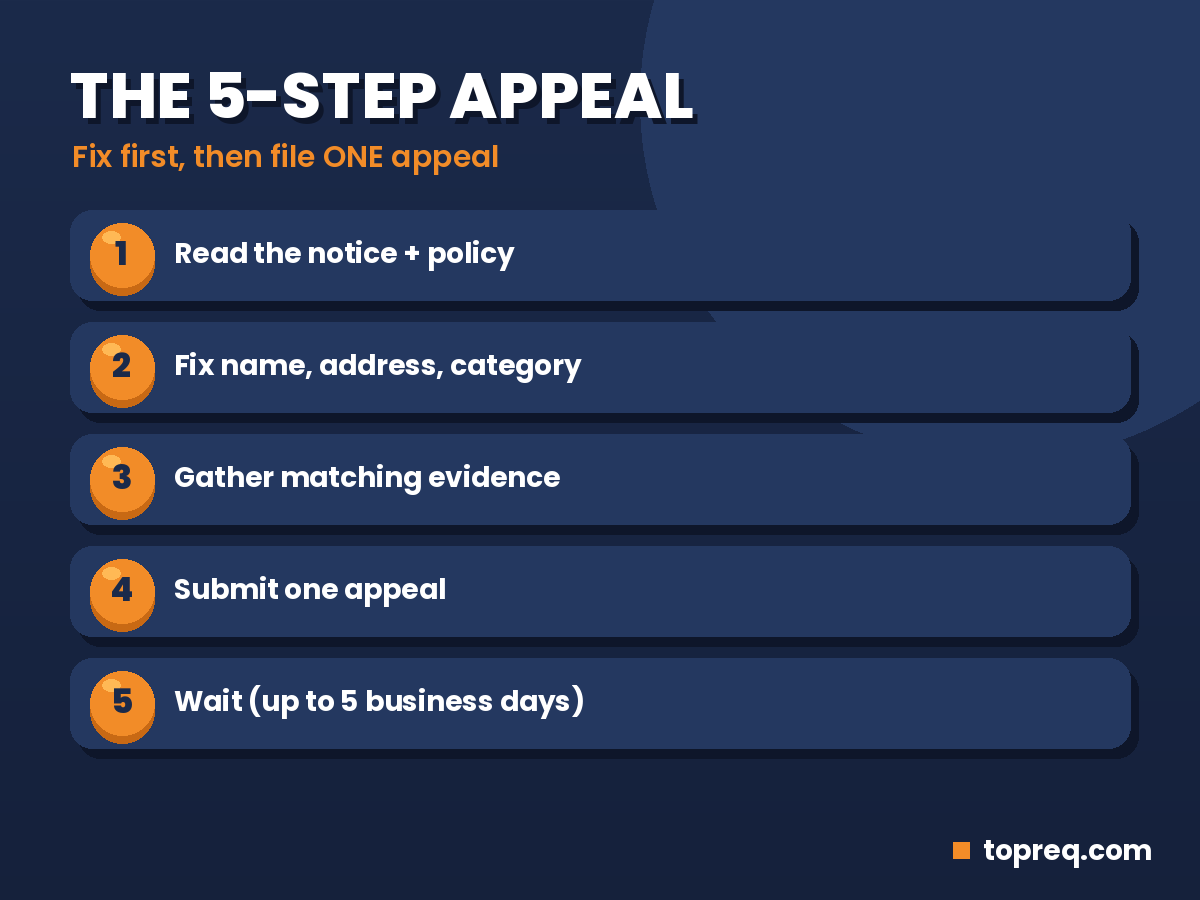
Sign in to the Google account that manages the profile and open the notice. The appeals tool shows the restricted profile, the reason for the action, and a link to the policy it relates to. Write down the policy name and the date. If the link points to the guidelines for representing your business, the problem is usually your name, address, category, or eligibility.
Also check whether the problem is at the account level. If you manage several profiles and they were all suspended at once, it’s likely an account restriction.
Step 2: Fix the Cause Before You Appeal
An appeal asks Google to look again. If the problem is still there, the answer will probably be the same. Go through the profile carefully:
- Name: exactly what appears on your signage, documents, and website. Remove any locations, services, or slogans you added.
- Address: a real place where you operate and staff during business hours. If customers don’t visit, hide the address and list service areas.
- Category: one primary category that best describes the business, plus only closely related extras.
- Phone: a local number that is answered by your business.
- Website: it should show the same name, address, and phone, and describe the same business.
- Duplicates: search Maps for your business and note any duplicate listings for the same location.
If you aren’t sure your profile matches Google’s guidelines, our step-by-step guide on setting up a Google Business Profile covers how each field should be filled in, and our local SEO checklist covers name, address, and phone consistency across the web.
Step 3: Gather Your Evidence
Google strongly recommends adding evidence to appeals. The goal is to prove three things: the business is real, it operates at the address or in the service area shown, and you’re authorized to manage it. Good evidence includes:
- Photos of permanent signage, the storefront, and the interior, ideally with the street address visible.
- Photos of a branded vehicle, uniforms, or equipment for a service-area business.
- A business license, registration, or tax certificate showing the business name.
- A utility bill or lease showing the business name and address.
- Recent invoices or receipts with the business name and contact details.
- A link to your website showing the same details as the profile.
Make sure every document shows the same business name and address as the profile. A mismatch between your evidence and your profile is a common reason appeals fail. Keep files clear and readable, and use photos taken recently.
Step 4: Submit One Appeal
Google explains the process on its appeal Business Profile restrictions page. The basic flow:
- Open the Google Business Profile appeals tool while signed in to the managing account.
- Select the suspended profile.
- Review the reason and the linked policy.
- Upload your evidence when prompted. Don’t skip this step, even if it says “optional.”
- Submit the appeal and note the date.
If there’s a text field, keep your explanation short and factual: what kind of business you are, how long you’ve operated, what you changed (for example, “removed the city name from the business name”), and what your evidence shows. Avoid long complaints or demands. The reviewer needs facts they can check.
Step 5: Wait and Track the Status
Google says appeal reviews and decisions can take up to 5 business days, and that you can check progress in the appeals tool. The status will show as under review, approved, or not approved. You’ll usually also get an email. While you wait, don’t submit a second appeal and don’t create a new profile.
If Your Appeal Is Denied
A denial isn’t always final. Google allows an additional review of a denied request, where you can include evidence you didn’t send the first time. Use it carefully:
- Look again for anything you didn’t fix, especially the business name and address.
- Add stronger evidence: a utility bill or license if you only sent photos, or clearer photos showing signage and the street.
- Make sure the documents match the profile exactly, down to suite numbers and spelling.
If your business is genuinely ineligible, for example because it only uses a virtual office, the honest fix is to change the setup. That could mean moving to an eligible staffed location, or switching to a service-area profile where that fits how you actually work.
The Google Business Profile Community forum is also worth using. Volunteer Product Experts there have seen many cases and can sometimes spot a problem you missed or escalate a clear false positive. Share your situation and evidence summary, but never your password.
After You’re Reinstated
Once your profile is back, it may take a short time to show fully in Search and Maps again. A few habits help prevent a repeat:
- Make edits one at a time, and avoid changing your name, address, and category together.
- If you move, update the address once you’re operating at the new location, and expect to verify again.
- Keep your website’s contact details identical to the profile. Our guide on what pages a small business website should have explains what a contact page should include.
- Follow the review rules: ask every customer, and never offer incentives.
- Check your profile monthly for edits from Google or the public, and correct anything that’s wrong.
If Google asks you to verify again after reinstatement, our guide to fixing a rejected video verification covers how to record a video that passes.
Frequently Asked Questions
How long does a Google Business Profile appeal take?
Google says reviews and decisions can take up to 5 business days. Check the status in the appeals tool rather than submitting another appeal.
Will I lose my reviews if my profile is suspended?
Reviews are usually kept while the profile is suspended, and they typically return when it’s reinstated. Deleting the profile or making a new one is the fastest way to lose them.
Can I create a new profile while my appeal is pending?
No. Google says not to create a new Business Profile for the same business while an appeal is under review. Duplicates can make your case worse.
Why was my profile suspended when I didn’t change anything?
Automated systems re-check profiles over time, and edits suggested by Google or the public can change your details without you noticing. Check the policy link in the notice and review your name, address, and category.
Can a home-based business get reinstated?
Yes, if it’s set up correctly. Service-area businesses should hide their home address and list the areas they serve. If customers do visit your home, you’ll need clear signage and evidence that you operate there.
Should I pay someone to reinstate my profile?
You can get help, but be careful. No one can guarantee reinstatement, and you should never share your password. Anyone helping should be added as a manager through Google’s own user settings.
Need a hand with your local presence? Boostology is a small web and digital marketing team that sets up and optimizes Google Business Profiles and builds fast, mobile-friendly websites for local businesses. Contact us or book a free 30-minute call.
Need help growing your business online? TopReq is run by the team at Boostology, a web design and digital marketing agency.
Services: Website Design, SEO, Social Media Management, Meta Ads.